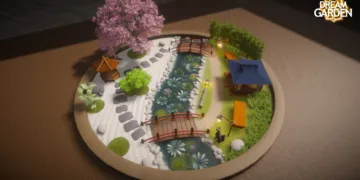































Games can offer refuge and challenge. Dream Garden, from Campfire Studio, provides a deliberate space to slow down and create. This sandbox builder concentrates on crafting small Japanese-inspired garden dioramas without a narrative, quest systems, or character interactions.
The game sets a single expectation: a place to shape terrain, place decorative elements, and observe a tiny environment respond. There are no objectives, no resource systems, and no progression trees pulling your attention. Creation becomes the central loop. Arranging stones, tuning lighting, and watching lanterns at dusk deliver a quiet satisfaction that grows with attention.
The game asks you to make choices for their own sake, to find small harmonies in placement and color. For players drawn to meditative design, Dream Garden provides an experience focused on calm composition, where the only gauge of success is how the scene feels to you.
Building Your World, Piece by Piece
Construction begins with straightforward choices about the canvas. You select a garden size and shape, then follow a short tutorial on object manipulation and scaling. The interface stays spare, and the menu appears via the spacebar. That minimal approach reduces friction and keeps tool use from interrupting creative flow. The tutorial covers manipulation and scaling basics so new users can begin arranging elements quickly. That quick start encourages immediate experimentation rather than delayed proficiency.
The terrain editor underpins every design decision. You can raise hills, carve ponds, and shape land with fine control. The editor favors subtle curves and natural contours instead of rigid geometry. Texture painting adds depth: apply grass, sand, or pebble layers with brushes that control type, transparency, opacity, and size. Stamp patterns introduce irregular coverage that mimics organic variation. The tools encourage layering and subtle variation, and the outcome shows minimal seams so bases read as natural rather than visibly assembled. These blended surfaces make assembled components read as single, unified ground rather than patched pieces, which helps maintain immersion during long, quiet observation sessions.
A smoothing tool makes recovery straightforward. You can experiment with dramatic terrain edits and then ease rough work back into gentle, natural forms. That ability removes fear of permanent mistakes and encourages a playful approach to shaping landscape. The smoothing process is forgiving, which changes the tone of experimentation from cautious to curious. That forgiving smoothing changes how you approach the tools: edits become invitations to test contrasts in slope and water, to watch how light reacts to new contours.
Decoration turns shape into scene. The asset library leans into Japanese garden motifs: temple furnishings, varied plants and trees, stone groupings, and animals spanning foxes and koi to capybaras and moose. Each asset includes animation. Trees sway in wind. Animals carry small routines. Fish glide through ponds. Those repeated motions shift single placements into living arrangements that invite slow watching and small discoveries. These small behaviors create emergent moments where separate objects interact visually, and those moments reward slow attention in ways that feel organic rather than scripted.
Customization reaches precise levels. Objects resize freely. Color controls accept exact hex codes for specific shades, so palettes can be tuned with care. Ambient layers such as butterflies, fireflies, and glowing insects add motion across the composition and create focal points. The hex code precision for color means you can match tones across objects, reinforcing cohesion, and layered effects let you push scenes toward either dense detail or quiet minimalism. Environmental options broaden the palette of moments: seasonal changes alter foliage and can cover the scene in snow during winter; weather toggles offer rain or clear skies; time-of-day settings move scenes from morning to dusk to night, each shifting light and mood in a pronounced way.
A rake tool lets you create patterns in sand and soil that echo traditional zen garden detail. That tool captures the game’s creative aim: a loop of making, watching, and refining until the arrangement matches your sense of completion.
The Art of Digital Calm
Dream Garden creates presence through careful restraint. Visuals use soft, handmade textures with a clay-like quality that lends tactility to objects. Assets balance realism and stylization, convincing while keeping a consistent artistic language. The palette favors warm browns, muted greens, and pale sands that remain subdued. Smooth edges and gentle lighting reinforce calm at every scale.
Day-night transitions add slow movement without breaking the contemplative tone. Watching morning light shift into a glowing sunset or seeing snow quietly cover your layout provides a temporal reward for observation. Lanterns and other light sources create subtle glows at dusk that highlight paths and water features.
Life in the scene supports ongoing attention. Trees continue their sway. Animals repeat daily motions. The environment breathes on its own and invites observation rather than demanding input.
Sound completes the sensory picture and anchors a mood over time. The soundtrack blends Japanese instrumental touches with Western piano to produce a meditative character. Music stays understated, supporting focus while avoiding intrusion. This measured approach gives the soundtrack room to enhance atmosphere without crowding silence. Ambient effects add texture: running water near ponds, wind chimes tinkling in the breeze, and evening crickets deepen the sense of place. The developers plan to release the soundtrack separately, a sign of its strength as listening material beyond play.
The presentation privileges calm over technical showmanship. Small details reward close attention: light filtering through leaves, accurate water reflections, and subtle texture shifts in stone. Those moments compound as you refine a space and make long sessions feel like careful study rather than repetitive placement. Dream Garden functions as a digital refuge designed to be observed and to soothe.
Limitations Within the Tranquility
Accessible design spans a broad age range. Younger players can begin building with little overhead, and the depth of customization options gives experienced creators room to explore. Controls become intuitive after a short familiarization period.

Platform constraints are notable. On PC, keyboard and mouse produce natural selection and manipulation. Steam Deck support exists but requires an attached mouse and involves trial-and-error for button combinations. Playing on Deck without a mouse fails to function. Controller support is absent, which excludes players who rely on those inputs.
The item menu proves frustrating. Small, unlabeled icons make identifying assets difficult. Players will often place objects simply to view them at full scale. The menu lacks enlargement or labeling features, producing accessibility problems for users with visual strain or impairments. A simple labeling option or larger icons would remove a barrier for several players and speed up composition work. That omission feels like a mismatch with the game’s welcoming intent and diminishes the design’s accessibility.
The asset library shows its limits during extended play. It supports initial gardens well, but repeated sessions reveal a scarcity of flower varieties and limited plant diversity. When you pursue varied color schemes or complex plant mixes, the choices feel constrained. That constraint nudges creators toward repeating familiar layouts instead of branching into distinct visual themes. Decorative items look attractive and perform well, yet creators soon desire more textures, furniture options, and flora to express different moods and themes. The absence of wider botanical and furniture options can encourage repetition and reduce long-term engagement.
Those shortages can test patience in a title designed for calm. The terrain tools remain excellent, animation quality impresses, and the atmosphere succeeds in creating a peaceful space. The game needs additional content and interface refinements to realize its longer-term potential. At a $7.99 price point, the package offers a solid foundation that could grow into something exceptional with more assets and quality-of-life updates. Additional assets and interface work would let the title hold attention longer and support the kind of deep, iterative design that suits its calming aims.
Dream Garden asks little in return from its players, and that generous spirit shapes how it should be judged. It contains flaws that merit attention, yet those issues fade once you settle into a late-night rhythm of arranging stones, watching fireflies, and feeling genuinely peaceful for a stretch of time.
Dream Garden is a cozy and relaxing simulation game centered around building miniature, Japanese-inspired garden dioramas. The game focuses on a tranquil, meditative atmosphere, allowing players to de-stress by shaping the landscape with tools to raise hills, dig ponds, channel rivers, and fill the space with various elements like sand, grass, and pebbles. Players can customize their creation with a wide selection of plants, trees, bridges, lamps, and other decorations, including the unique ability to use a rake tool to trace intricate patterns into the sand, similar to a real-life zen garden. Developed and published by Campfire Studio, Dream Garden was fully released on November 3, 2025, and is available on PC (Steam) and macOS.
Full Credits
Producers/Studio Leadership (Producers, Executive Producers, and Key Studio Heads): Campfire Studio
Composer/Sound Director: Veronika Moskalevets
Developer, Publisher: Campfire Studio
Release Date: November 3, 2025
The Review
Dream Garden
Dream Garden succeeds where it matters most: creating a genuinely peaceful space for creativity. The terrain tools feel precise, the animations breathe life into every placement, and the audio-visual presentation achieves real serenity. Small menu icons and limited asset variety frustrate, particularly during extended sessions, but these flaws diminish once you're absorbed in shaping your miniature world. For players seeking meditative experiences without pressure or failure, this offers exactly what it promises at a fair price.
PROS
- Intuitive terrain sculpting with excellent smoothing tools
- Beautiful handcrafted aesthetic with living animations
- Calming soundtrack and ambient sound design
- No goals or failure states, pure creative freedom
- Precise color customization with hex codes
CONS
- Small, unlabeled menu icons make identification difficult
- Limited asset variety, especially flowers and decorative items
- Poor Steam Deck compatibility without mouse
- No menu enlargement options for accessibility